


Work today spans teams, locations, and systems, but disconnected tools make it hard to see what’s happening or respond quickly. Updates to the Eptura platform deliver clarity and reduce friction, unifying operations with real-time views across spaces, assets, visitors, and daily activity so teams can act quickly, together. Leaders and operators share one picture of performance to adjust space, address issues as they emerge, and make decisions before they escalate.
We’re also introducing AI-powered experiences that bring intelligent support into everyday work — using natural language to plan workdays, manage visitor flows, explore space scenarios, and prioritize maintenance in a single view. Built on a more connected foundation across locations, teams, and systems, these capabilities make it easier to scale consistently, empowering you to meet increasing demand and complexity.
Key takeaways
- Eptura announces platform updates: New capabilities deliver unified operations, AI-powered workplace experiences, and enterprise-scale integration to help organizations gain clarity, respond to change, and scale consistently across locations and teams
- Breaking down silos for complete visibility: Real-time dashboards unify space utilization, visitor management, and maintenance operations into a single source of truth, eliminating the guesswork that comes from fragmented data across multiple systems
- AI meets the everyday workplace: Natural language planning tools, automated no-show detection, and intelligent service prioritization transform routine tasks into seamless experiences, letting teams focus on strategic decisions rather than manual coordination
The value of clarity: Breaking down data silos and removing blind spots
Many organizations operate with incomplete visibility into their workplace operations. Space utilization data exists in one system, employee feedback in another, service requests in a third. When CFOs request proof that workplace strategy is delivering value, teams scramble to compile spreadsheets and reconcile disparate data sources.
With a unified approach, you can transform complexity into clarity and lead your organization toward better outcomes like improved space utilization, reduced real estate costs, higher employee satisfaction, accelerated decision-making, and more efficient, data-driven operations.
Real-time space utilization dashboards
Our dashboards reveal actionable patterns across every floor, building, and region. Facility and real estate leaders can instantly see which spaces are underused, which are in high demand, and how usage shifts throughout the week. This enables confident consolidation, repurposing, or expansion decisions without guesswork.
Organizations can identify floors or zones that consistently sit empty and reallocate them for project teams or new business units. They can spot peak congestion in meeting rooms and adjust booking policies or layouts to improve access and track utilization trends to inform lease renewals, expansions, or consolidations.
Scenario modeling and block/stack planning
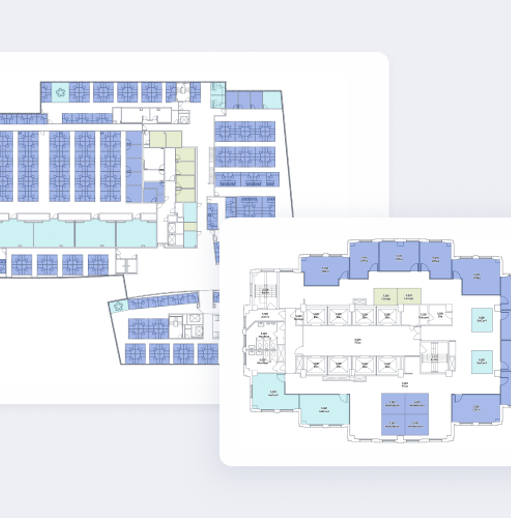
Scenario modeling lets teams simulate changes before implementation. Visual block/stack tools enable testing of seating ratios, floor clearances, and building restacks. This enables portfolio right-sizing and supporting smoother relocations.

Teams can bulk update assignments, shift to flexible seating models, or plan for growth in a secure environment.
Growing organizations can better plan for mergers or acquisitions by modeling how teams will fit into new spaces. They can test the impact of moving to activity-based working or hybrid models. Teams can also prepare for lease endings by visualizing downsizing or relocation scenarios.
Board-ready dashboards
Dashboards combine utilization, cost, and operational performance into executive-ready reports. Stakeholders gain a single, trusted view of real estate ROI, occupancy, and cost benchmarks, eliminating manual data wrangling.
Teams make faster, more confident decisions and strategic planning. Organizations can share portfolio performance with the C-suite, showing cost savings and utilization improvements. They can benchmark buildings against each other to prioritize investments or divestitures. Teams can also export detailed data for finance, HR, or compliance teams.
The need for flexibility: Building workplaces that keep up with reality
Agility means more than hybrid work accommodation. Organizations face acquisitions that double headcount, rapid growth that disrupts space planning, and regulatory changes requiring operational adjustments. Legacy systems fail under this pressure because they were only ever supposed to work in environments where change operated on slow quarterly cycles rather than rapid transformations.
By embracing flexibility, leaders can confidently respond to surges in demand, reduce wasted space, accelerate operational changes, and deliver a seamless experience for every team—no matter how fast reality shifts.
AI-powered team day planning
Our natural language assistant in Microsoft Teams enables managers to plan team days, find optimal spaces, and automate seat allocation, supporting coordination of hybrid schedules, ensuring teams sit together and adapting to last-minute changes without manual effort.
Organizations can also plan weekly in-office days for distributed teams, ensuring everyone has a desk near colleagues, respond to sudden headcount changes by quickly reallocating space, and enable managers to book for their teams, reducing friction and boosting collaboration.
Desk, room, and neighborhood booking
Eptura supports comprehensive booking capabilities for individuals, teams, and neighborhoods, including recurring meetings, quick swaps, and booking on behalf of others. Users can reserve resources like parking, wellness rooms, and event spaces, all from web, mobile, or Teams interfaces.
Organizations can launch hot desking pilots across multiple buildings while tracking adoption and utilization, enable executive assistants to book spaces for leadership teams, and support surge capacity for project teams or events.
Sensor-powered no-show auto-release
Integrated sensors automatically detect no-shows and vacant spaces, releasing them back into the booking pool to keep supply aligned with real demand, reduce wasted capacity, and ensure employees always have access to available space.
The system helps eliminate the frustration of “ghost bookings” where reserved spaces sit empty. It maximizes utilization, especially in high-demand environments, and supports dynamic workplace policies where spaces are only held when actually used.
Organizations can automatically free up meeting rooms if attendees don’t check in, making them available for others, release desks after a set period of inactivity to support flexible seating, and provide real-time occupancy data to inform cleaning, maintenance, and security operations.
The power of experience: Connecting people and spaces with better technology
Most workplace technology isn’t optimized for its daily users, which drives employees back to slow, unreliable, manual methods rather than using expensive booking systems. The disconnect between system capability and user adoption means both lost investment and wasted time.
Every employee interaction with workplace technology either introduces friction or removes it — and that friction has a measurable impact on productivity and operational costs. When technology is intuitive and connected, employees can focus on their work instead of navigating cumbersome systems, leading to higher adoption, more accurate data, and better workplace outcomes.
Unified workplace interface for web, mobile, and Microsoft 365
Employees can book, coordinate, and manage their workplace from the tools they already use, including their browser, mobile app, and work hub integrations with Teams, Outlook, and Google Calendar.
They can book desks and rooms from their calendar without switching apps, allowing facility teams to manage service requests and bookings from a centralized dashboard, and providing new hires with wayfinding tools integrated into their onboarding experience.
Touchless visitor management and access control
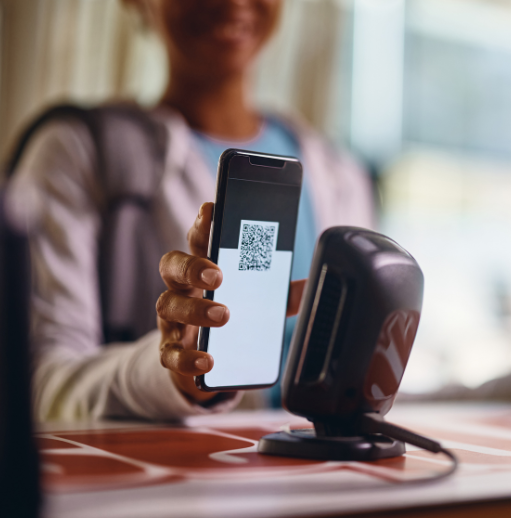
Eptura streamlines visitor check-in with pre-registration, digital badges, and secure access workflows.
Organizations can host high-profile client meetings with seamless, secure check-in. They can automate access permissions for contractors or temporary staff. Teams can also track visitor flows for compliance and audit purposes.
In-app service requests and issue reporting
Employees can report broken equipment or facility issues with photos and location tags. Maintenance teams can track resolution times and SLA compliance. Field technicians can update asset records and close tickets from mobile devices.
Service teams manage, prioritize, and resolve tickets in a centralized workspace, eliminating email-based tracking. This allows employees to report broken equipment or facility issues with photos and location tags, enables tracking of resolution times and SLA compliance for maintenance teams, and lets field technicians update asset records and close tickets from mobile devices.
Enhanced experience drives improved space utilization because intuitive systems see higher adoption rates. When employees consistently use booking systems, occupancy data becomes accurate, utilization metrics become reliable, and decisions become grounded in operational reality.
Integration: Setting the foundation that makes everything else possible
Integration provides the foundation that enables enterprise-scale deployment, but too many workplace platforms promise comprehensive capability but fail to coexist with enterprise operational reality.
Enterprise foundations for secure, scalable operations
Eptura unifies identity, device management, and integrations to cut complexity and accelerate time-to-value to provide a consistent backbone for governance, reliability, and growth.
Our updates include:
- Centralized authentication and SCIM provisioning: Unifies login and automates user lifecycle across identity providers for secure, scalable access. Enables faster onboarding, consistent policy enforcement, and audit-ready logs
- Device hub and unified device management: Centralizes telemetry, health, and connectivity for screens, sensors, and kiosks. IT teams can monitor, update, and migrate fleets without downtime, ensuring accurate occupancy data from a single dashboard
- Unified API and enterprise connectors: Standardized APIs and connectors for Microsoft 365, ServiceNow, Okta, Google Workspace, and more. Automate bookings and visitor flows, build custom dashboards, and integrate access control for unified governance
Asset and maintenance teams also get a set of reliability and control enhancements, with:
- Performance improvements for large lists: Faster load times and smoother navigation in asset, inventory, preventive maintenance, and work order lists
- Asset downtime control on work order completion: New settings let you decide if completing a work order should automatically return a down asset to active status or keep it down for manual review. Includes API support for downtime status
- Barcode improvements: Print part barcodes directly from purchase orders, with new options to include vendor part ID, bin tree, and descriptions for better inventory tracking
Plus, general maintenance and usability fixes like improved work type validation, more accurate inventory displays, better purchase order visibility, and fixes for invoice date handling, and advanced work order search for migrated data.
Sandbox for safe change
Eptura provides a secure sandbox for testing configurations, policies, and devices before rolling out changes into production, reducing risk and ensuring smooth transitions. Organizations can test new booking policies or layouts without impacting live operations, validate device integrations and upgrades before global rollout, and experiment with workflow automations and integrations in a safe environment.
For IT and security leaders, this means reduced risk by eliminating shadow IT and unified workflows that enforce governance. The integration pillar transforms Eptura from a workplace application into strategic enterprise infrastructure that scales with organizational complexity while maintaining security and compliance standards.
Explore all the latest updates
Discover how our unified platform delivers greater clarity, control, and measurable results for organizations navigating today’s complex environments. From enhanced integrations and security to smarter analytics and a seamless user experience, these updates help you make more informed decisions. They reduce operational friction and help you realize value faster across your entire portfolio.
Frequently Asked Questions

By Erin Sevitz
As Vice President of Content and Customer Marketing at Eptura, Erin Sevitz oversees teams responsible for providing worktech insights and engaging 25 million Eptura users worldwide. With over 10 years in thought leadership on workplace management and the built environment, Erin brings deep industry knowledge to her role. Previously, she led communications for the International Facility Management Association, a global nonprofit dedicated to professional development for workplace strategists and building managers, and served as editor in chief for IFMA’s FMJ magazine.