


For facility and maintenance teams, a solid troubleshooting process helps them learn from every breakdown, so the next fix is faster, smarter, and more reliable. When technicians can access asset history, document their solutions, and share knowledge across the team with a digital maintenance management solution, troubleshooting becomes a repeatable process that helps you improve maintenance policies and processes over time.
Key takeaways
- Troubleshooting is faster with centralized data. Digital tools help technicians access asset history, failure trends, and repair records in seconds
- Standardized workflows reduce guesswork. Step-by-step troubleshooting protocols ensure consistent responses across teams and shifts
- Knowledge sharing improves team performance. When insights are documented and accessible, junior technicians can solve problems without relying on senior staff
Key features of a modern facility management solution help maintenance teams turn scattered data into actionable troubleshooting insights.
Troubleshooting in facility and maintenance management: The art and science of finding fixes faster
Troubleshooting is the process of diagnosing and resolving problems in equipment, systems, or processes. When the team has a reliable systematic process in place, troubleshooting reduces downtime, improves safety, and extends asset life.
Troubleshooting isn’t just about fixing what’s broken, though. It’s about learning from every breakdown. When technicians document what went wrong and how they resolved it, they create a knowledge base that helps the entire team respond faster next time, and that’s especially important in environments with high asset volume or limited staffing, where repeat failures can quickly disrupt operations.
A structured troubleshooting process also helps standardize responses across shifts and locations. Instead of relying on memory or guesswork, technicians can access asset history, failure codes, and documented solutions from similar incidents.

You get fewer delays, fewer mistakes, and more consistent outcomes.
With the right tools, troubleshooting becomes a repeatable process that improves over time. Teams build confidence, reduce reliance on senior staff, and make smarter decisions based on real data, not assumptions.
Access complete asset history in seconds
Trying to troubleshoot without context leads to repeated failures. Technicians need access to recent work orders, inspection results, and replacement part records to make informed decisions.
Instead of digging through spreadsheets or paper logs, a digital FM solution stores everything in one place.
Technicians can pull up:
- Maintenance history
- Repair notes
- Inspection reports
- Parts specifications
- Manufacturer manuals
- Warranty information
For example, a technician at a bottling plant is called to fix a conveyor motor that keeps stalling. They access the asset record and see that the motor was replaced twice in the last six months. Reviewing the inspection logs, they notice a recurring note about heat damage. They check the ventilation specs and discover the cooling fan is undersized. With the right data, they solve the root issue instead of repeating the same repair.
Use checklists to eliminate the obvious
Jumping to conclusions can waste time and lead to incorrect repairs. A better approach is to rule out the most obvious causes first, for example improperly installed parts or overlooked damage.
Digital checklists guide technicians through a structured process, combining their experience with real-time data. The system helps them eliminate common issues and focus on what’s most likely to be the root cause.
Technicians can:
- Follow asset-specific troubleshooting workflows
- Log each step taken and result observed
- Attach photos or videos to confirm findings
- Flag anomalies for supervisor review
So, at a distribution center, a technician needs to fix a dock door that won’t close. The checklist prompts them to verify power, inspect the control panel, and check the track. They log each step and attach a photo showing a bent track. The checklist helps them avoid wasting time on electrical diagnostics.
Archive insights to build team-wide knowledge
Troubleshooting is part science, part experience. When technicians document their theories and solutions, they create a knowledge base that helps the entire team.
A facility management solution makes it easy to attach notes, photos, and observations to asset records. The next time the same issue occurs, technicians can search for similar failures by asset type or location, review previous diagnoses and fixes, and then learn from documented best practices.
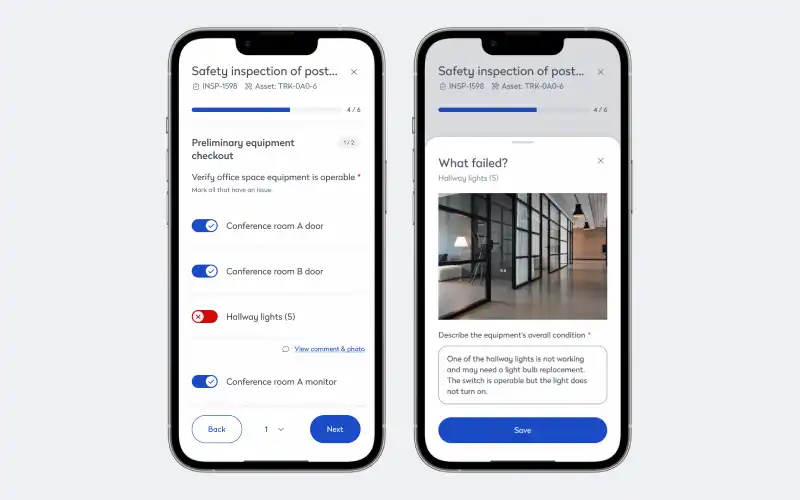
For example, a junior technician at a hotel is assigned to fix a leaking dishwasher. They search the asset record and find a note from a previous repair that identified a cracked seal. They inspect the same area, confirm the issue, and fix it without needing to escalate. Their update adds a photo and part number for future reference.
Track failure codes to spot recurring issues
A lot of problems don’t happen just once. If a breakdown keeps happening, it’s a sign of a deeper issue. With failure codes and standardized categories, you can track trends across assets and locations.
Digital FM tools let you:
- Assign consistent failure codes to each breakdown
- Filter breakdowns by type, frequency, and cause
- Generate reports to identify recurring issues
- Prioritize fixes based on impact and urgency
At a manufacturing plane, a packaging machine jams every night shift. Technicians log each incident with the failure code “mechanical obstruction.” The maintenance manager runs a report and sees the same code across three machines. They trace the issue to a defective gear model and replace it across the line.
Document solutions to support continuous improvement
Troubleshooting doesn’t end when the asset is back online. The final step is documenting what worked. That information feeds into your preventive maintenance strategy and helps junior technicians learn from past repairs.
With a centralized system, every solution becomes part of the asset’s history, so you can:
- Record the final diagnosis
- Log the repair steps taken
- Attach photos or videos of the fix
- Note any follow-up actions required
At a municipal water treatment plant, a pump fails due to cavitation. The technician adjusts the inlet pressure and logs the fix, including a video and a note about identifying symptoms. Months later, a new technician resolves a similar issue in minutes by reviewing the archived solution.
Tips for better asset and equipment maintenance troubleshooting
A solid troubleshooting process starts with good habits that help technicians stay focused, reduce errors, and make smarter decisions in the moment.
- Start with the basics: Always verify power, connections, and settings before diving into deeper diagnostics. Many issues stem from simple oversights that are easy to fix once identified
- Use the asset record as your guide: Reviewing past work orders, inspection notes, and repair history can reveal patterns that point to the root cause. Context helps technicians avoid repeating the same fix without solving the underlying issue
- Follow a checklist, even if you know the asset: Structured workflows reduce bias and ensure no steps are skipped, especially under time pressure. Familiarity can lead to assumptions, but a checklist keeps the process consistent
- Document everything: Notes, photos, and videos from each repair create a reference for future troubleshooting. Documentation helps other technicians solve similar problems faster and with more confidence.
- Tag recurring issues with failure codes: Consistent coding makes it easier to track trends across assets and locations. Over time, this data helps prioritize preventive fixes and reduce repeat breakdowns
- Ask for input, then share your findings: Collaboration improves accuracy and helps uncover blind spots. When technicians share what they learn, the whole team benefits from stronger collective knowledge
- Don’t rush the final step: Once the asset is back online, take time to log the solution and any follow-up actions, so your final step turns a quick fix into a long-term improvement
Troubleshooting is part technical skill, part process discipline. When technicians combine experience with structured workflows and shared data, they solve problems faster and build a stronger maintenance culture.
Share centralized data to troubleshoot smarter
Troubleshooting shouldn’t have to rely on memory or guesswork. With a digital facility management Troubleshooting is a chance to strengthen your maintenance strategy. With centralized data and structured workflows, technicians can respond quickly, make informed decisions, and document every fix to support long-term improvement. A digital facility management solution helps teams reduce repeat failures, improve consistency across shifts, and build a shared knowledge base. When every repair adds to your understanding, your team becomes more confident, more efficient, and better prepared for the next challenge.
Frequently asked questions

By Jonathan Davis
As a content creator at Eptura, Jonathan Davis covers asset management, maintenance software, and SaaS solutions, delivering thought leadership with actionable insights across industries such as fleet, manufacturing, healthcare, and hospitality. Jonathan’s writing focuses on topics to help enterprises optimize their operations, including building lifecycle management, digital twins, BIM for facility management, and preventive and predictive maintenance strategies. With a master's degree in journalism and a diverse background that includes writing textbooks, editing video game dialogue, and teaching English as a foreign language, Jonathan brings a versatile perspective to his content creation.