

Once leadership approves a new occupancy policy, workplace teams have to translate a set of expectations into a workable employee experience. Attendance patterns change, and managers start receiving questions about scheduling, space, exceptions, and team coordination.
The right rollout plan gives your workplace teams the structure to manage those changes without asking employees to navigate the details on their own.
Key takeaways
- Test workplace policies under real conditions: Use a representative pilot, baseline data, and defined thresholds to find capacity, booking, and service problems before expanding the rollout
- Make the policy easier to follow: Give managers clear authority, deliver guidance when employees need to act, and assign every issue to a named owner so employees do not have to navigate the rollout alone
- Measure friction, not attendance alone: Review reservation activity, utilization, service requests, employee feedback, and other operational signals together, then use scheduled adjustment cycles to improve the rollout over time
Occupancy change management continues after the policy launches. Workplace teams need a repeatable process for identifying friction, deciding what to change, and confirming whether each adjustment improves employee experience.
Use a pilot to test your rollout under real conditions
Choose a pilot group that exposes the operational demands you expect to face during the wider rollout. Include teams with different attendance patterns, workspace needs, and levels of schedule flexibility. If the policy affects several locations, select a site that reflects the space mix and service capacity of the offices that will follow.
Before the pilot begins, document a baseline for the measures you plan to track. Pull several weeks of reservation activity, attendance, utilization, meeting room demand, service requests, and employee feedback. The baseline gives you something concrete to compare against once employees start working under the new policy.
Set pilot thresholds that will trigger action. For example, decide how much reservation demand a floor can absorb before you open additional capacity, how long employees should wait for support, and what level of repeated booking failures requires a workflow change. You can then respond to a defined operational signal instead of debating whether a problem has become serious enough to address.
Use pilot data to identify capacity risks early
Pilot data often looks better in the aggregate than it does in practice. Overall utilization might appear healthy while employees struggle to find collaboration space on Tuesdays or reserve meeting rooms on peak office days. Review results by weekday, team, location, and space type to identify the problems employees will actually experience during a larger rollout, not just the trends that appear in a monthly dashboard.
If the pilot produces uneven demand, adjust team schedules, release additional inventory, or change how employees reserve space before you add more participants.
You can also adjust booking windows, capacity limits, neighborhoods, and auto-release rules to better align space availability with demand before expanding participation.
Connected workplace data can help you get more value from pilot results, particularly when you’re evaluating whether the rollout is ready to expand. Occupancy trends, reservation activity, check-in data, and utilization patterns often reveal emerging capacity issues before employees start reporting them. Use those signals to model attendance scenarios, adjust space allocations, and identify operational risks while the pilot population is still small.
With a modern workplace platform, teams can analyze reservation activity, utilization, and check-in trends by location, weekday, team, and space type to understand where demand is likely to concentrate before expanding the rollout.
AI-backed workflows can help you explore those signals more quickly by surfacing unusual demand patterns and comparing potential attendance scenarios. For example, you could evaluate how moving one department’s anchor day would affect meeting room demand, neighborhood capacity, and available collaboration space before changing the rollout. Treat those results as recommendations to review, not decisions the system makes on its own.
Give managers the answers and authority they need
Managers need clear instructions for the decisions they will handle and a direct route for escalating everything else. Give them a short implementation guide that covers attendance expectations, team-day coordination, missed office days, short-term exceptions, recurring exceptions, and the support available to employees.
Separate manager discretion from formal policy exceptions. If managers can approve occasional schedule changes, define the circumstances and explain how they should record them. If human resources or another function must approve recurring arrangements, tell managers where to send the request and what information the receiving team needs.
Provide response language for the questions employees will ask most often. Managers should not have to write their own explanations of how the organization uses reservations, check-ins, and utilization data to support workplace planning, what employees need to reserve, or how the policy applies when a location reaches capacity. Approved answers reduce contradictory guidance across teams and limit the number of routine questions that reach workplace operations.
Connect policy expectations to business outcomes
Managers also need to understand the business rationale behind the policy. In “Eptura Insights: Building business cases and buy-in for worktech implementations,” Erik Zink, VP, Corporate Development and Strategy and Chief of Staff, and Sarah Kilmartin, Director, Sales Strategy & Intelligence, share how workplace initiatives gain traction when leaders connect them to outcomes stakeholders already care about.
“You need to ‘speak someone’s language’ to get them to hear what you’re saying,” they explain.
Employees are more likely to accept attendance expectations, reservation requirements, and space planning decisions when managers can explain how they support goals such as productivity, collaboration, operational efficiency, or employee experience instead of presenting them as administrative requirements.
Build communication around the actions employees need to take
Many organizations assume adoption will follow naturally once a policy is announced, but employees often need help understanding how the change fits into the broader workplace strategy. In “Eptura Insights: Digital transformation as a solution to change and uncertainty,” Erik and Sarah note that organizations are increasingly hiring digital workplace leaders because implementing technology and changing employee behavior are not the same challenge.
Employees need to understand what they’re expected to do and how the change supports workplace experience, operational goals, and business outcomes.
Align communication with employee actions
Start with the effective date, affected locations, attendance expectations, and source of support. Follow with instructions for planning office days, coordinating with colleagues, reserving space, checking in, and reporting problems.
Most employees don’t think about reservation policies until they need a workspace. They don’t look for booking instructions when the rollout announcement arrives. They look for them when they’re trying to reserve a desk for next Tuesday. Communication works best when it arrives at the moment employees need to take action.
For example, share arrival and check-in guidance shortly before the first required office day. Publish reminders before periods when demand historically increases, especially when several teams plan to attend on the same days.

Use the systems employees already check while planning their work. Email can establish the timeline, while collaboration platforms and workplace applications can deliver reminders closer to the task. Keep one internal page as the source of record so employees and managers can confirm the current guidance without searching through old announcements.
For many organizations, Outlook, Microsoft Teams, and mobile workplace applications are already part of the daily workflow, making them effective channels for reservation reminders, check-in prompts, and workplace updates.
AI assistance can reduce the distance between guidance and action.
Instead of asking employees to leave their normal workflow and interpret a separate reservation guide, a workplace assistant can help them find a suitable office day, reserve a desk, or locate a meeting room through a natural-language request.
The interaction still needs to reflect current policy rules, available inventory, and approved employee preferences, so the recommendation is both useful and explainable.
Track communication performance through employee actions. If employees continue to arrive without reservations, revisit the booking instructions and where you place them. If they create reservations but fail to check in, clarify the arrival process and explain when the system releases unused space. Repeated behavior tells you where the instructions or workflow need attention.
Monitor whether employees successfully complete key actions such as reserving a workspace, checking in upon arrival, or coordinating office days with colleagues. These behaviors often provide more useful implementation signals than message open rates alone.
Turn employee feedback into specific operational changes
A short pulse survey after the first week can capture immediate confusion, while later feedback can show whether employees can coordinate schedules, find suitable spaces, and access support consistently.
Ask questions that point toward a decision. General satisfaction scores can help identify trends, but they rarely tell you what to change. Questions tied to a specific office visit produce more actionable feedback because they connect employee experiences to reservation processes, space planning, technology performance, workplace services, and communication efforts.
| Generic feedback question | Decision-focused alternative | What the answer helps you decide |
| How satisfied are you with the new policy? | Were you able to reserve the workspace you needed for your visit? | Whether reservation rules, inventory, or booking guidance need adjustment |
| How satisfied are you with the office experience? | Did the space support the work you planned to do that day? | Whether the current mix of focus, collaboration, and meeting spaces aligns with demand |
| Do you like the new occupancy policy? | Were your teammates onsite when you needed to collaborate with them? | Whether team scheduling guidance requires refinement |
| Was finding workspace easy? | Did you spend time searching for another workspace after arriving? | Whether utilization data reflects actual workplace suitability |
| Was your visit productive? | Did noise, privacy, comfort, or overcrowding prevent you from working as planned? | Whether workplace conditions are affecting adoption |
| Were the workplace tools effective? | Did a room, audiovisual, or technology issue delay a meeting or interrupt your work? | Whether support, maintenance, or technology investments should be prioritized |
| Was communication clear? | Did you know how to reserve space, check in, and request support before your visit? | Whether communication materials and onboarding need improvement |
| Was support available when needed? | Did you know where to report an issue or request help? | Whether escalation paths are clear and accessible |
| Would you recommend the workplace to others? | What was the biggest obstacle you encountered during your last visit? | Which operational issue creates the most friction today |
| Do you support the occupancy policy? | What would have improved your visit the most? | Which change would likely have the highest impact on employee experience and adoption |
When employees describe what happened during a recent visit, for example, you can compare their responses with utilization, occupancy, reservation, and service data to identify the operational changes most likely to improve adoption.
Route each issue to a named owner
Create an escalation matrix before launch and organize it around the issues employees and managers will encounter. For each category, name the owner, submission channel, required information, response target, and next escalation point. Publish the employee-facing routes in the rollout materials and keep the full ownership model available to managers and support teams.
Your matrix might assign booking and space availability issues to workplace operations, equipment failures to information technology or facilities, accessibility requests to the appropriate employee support function, and policy exceptions to human resources.
The same issue can look different depending on who receives it. An employee who can’t reserve a workspace might report a technology problem. Workplace operations might see a capacity issue. Facilities might see available space sitting empty nearby. Without clear ownership and shared data, teams can spend more time transferring requests than resolving them.
Clarify cross-functional accountability
Cross-functional coordination is often the difference between a smooth rollout and a frustrating one. In “Eptura Insights: Adopting a value integrator mindset for CRE success,” Erik and Sarah argue that organizations need people who can think across departmental boundaries and understand how different groups define success, and they describe these “value integrators” as the bridge between workplace initiatives and broader business goals.
Occupancy change management creates exactly this type of challenge. A booking issue might involve workplace operations, technology, facilities, and human resources at the same time, making clear ownership and coordination essential.
Review escalations as implementation data rather than isolated tickets. Tag each issue by type, location, weekday, and resolution. A cluster of booking conflicts may point to insufficient inventory, poor release rules, or concentrated team days. Repeated policy questions may show that managers need updated guidance rather than another organization-wide announcement.
Large rollouts can generate hundreds or thousands of support requests. Service workflows, automated routing, and reporting can help categorize issues, identify recurring root causes, and surface patterns that might otherwise remain hidden in ticket queues. If booking conflicts increase across several locations or technology issues spike on specific days, workplace teams can investigate the underlying operational cause instead of treating each request as an isolated event.
With connected service workflows, organizations can route requests to workplace operations, facilities, or information technology teams using defined ownership rules, escalation paths, and service-level targets. The goal is to help workplace teams focus attention where operational changes will have the greatest impact.
Measure whether employees can follow the policy successfully with minimal friction
Build an adoption scorecard that connects policy participation with the workplace conditions employees experience. Start with reservation and check-in activity, then add utilization, unmet demand, no-show rates, service requests, employee feedback, and issue-resolution time.
The most useful implementation signals rarely come from a single metric. Attendance might increase while service requests climb. Reservation activity might grow while employees continue reporting difficulty finding suitable space. A location may meet attendance expectations but generate an unusually high number of booking conflicts. Those situations tell you to investigate further rather than assume the rollout is succeeding because one measure looks healthy.

Once you’ve connected each metric to a decision, unified workplace analytics can help evaluate those signals together. Reservation activity, utilization trends, service requests, attendance patterns, and employee feedback often influence one another. Review those measures as part of a connected workplace experience to identify where capacity changes, scheduling adjustments, workplace guidance, or policy refinements are most likely to improve outcomes.
Use unified insights to support workplace decisions but keep accountability and final decision-making with workplace leaders. Employees need clear explanations of how workplace data informs recommendations, along with appropriate review and human oversight.
Use attendance, reservation, and utilization trends to identify teams or locations that may benefit from additional schedule coordination, workplace guidance, or capacity adjustments. Use reservation and utilization data to compare planned demand with actual occupancy.
You can use no-show rates to decide whether check-in reminders or automatic release rules need adjustment. Review service-request volume and resolution time to determine whether your support model can handle the rollout.
Measure operational improvements, not just compliance
Avoid making productivity the only proof of success. Track outcomes you can connect directly to workplace operations, technology performance, and employee experience, including:
- Failed bookings: Identify where employees cannot complete reservations because of unavailable inventory, configuration issues, or unclear workflows
- Unmet space demand: Compare requests with available space by location, weekday, and space type to guide capacity and scheduling decisions
- Check-in rates: Determine whether reminders, arrival instructions, or auto-release settings need adjustment
- Issue-resolution times: Measure whether workplace operations, facilities, and technology teams can resolve rollout-related problems within expected service targets
- Employee ability to find suitable space: Use feedback alongside reservation and utilization data to assess whether the workplace supports the work employees plan to do
Together, these measures show whether employees can plan and complete office visits with fewer obstacles. They also give you a stronger basis for improving workplace operations than a compliance figure alone.
Run adjustment cycles on a fixed schedule
Schedule rollout reviews before implementation begins. During the pilot and initial expansion, a weekly review can help you address immediate problems. As operating patterns stabilize, move to a monthly or quarterly cycle that matches the pace of your workplace planning.
Use the same review sequence each time. First, compare adoption and operational measures with your baseline and thresholds. Next, review manager input, employee feedback, and escalations. Then assign each agreed change to an owner, record the expected result, and set a date for checking whether the change worked.
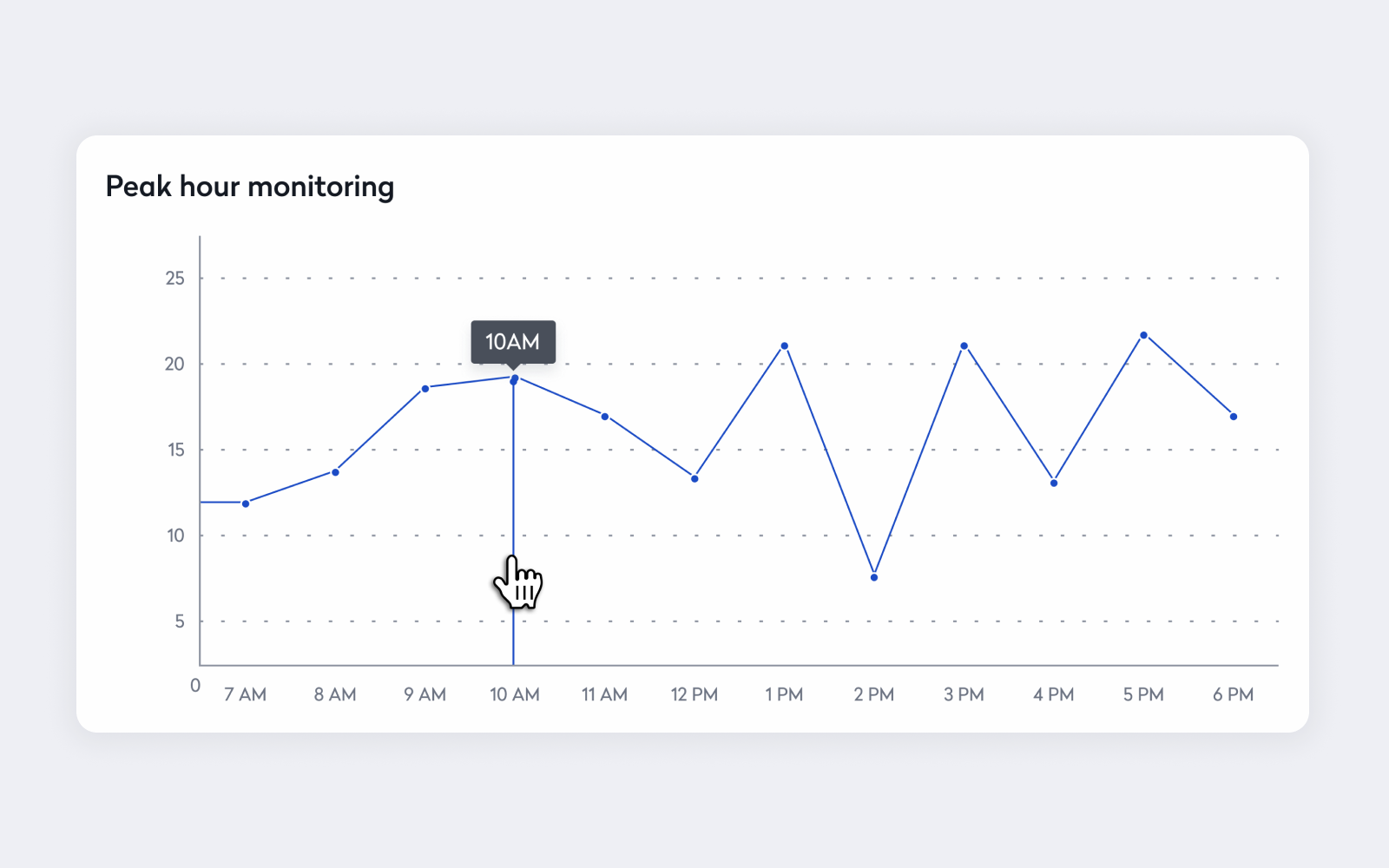
Keep policy compliance and operational performance separate during these reviews. Low participation may require additional schedule coordination or clearer manager guidance, while strong demand combined with failed bookings requires a workplace response. Treating every problem as a compliance issue can hide the changes employees need to meet expectations.
Limit each cycle to changes you can evaluate. Adjust a booking rule, communication step, manager instruction, or allocation of space, then monitor the relevant measure. When several changes occur simultaneously, you may struggle to identify which one improved the result.
Turn the rollout into a repeatable operating model
Occupancy change management doesn’t end at launch. Workplace teams need to monitor adoption, identify friction points, and adjust policies as employee behavior evolves.
To connect reservations, check-ins, utilization insights, and service workflows to create a more responsive workplace experience, learn more about workplace management software.
Frequently Asked Questions

By Erin Sevitz
As Vice President of Content and Customer Marketing at Eptura, Erin Sevitz oversees teams responsible for providing worktech insights and engaging 25 million Eptura users worldwide. With over 10 years in thought leadership on workplace management and the built environment, Erin brings deep industry knowledge to her role. Previously, she led communications for the International Facility Management Association, a global nonprofit dedicated to professional development for workplace strategists and building managers, and served as editor in chief for IFMA’s FMJ magazine.