


Although many people love black-and-white movies and vinyl records, there’s a reason no one’s nostalgic for paper- and spreadsheet-based maintenance workflows. Efficient, effective facility and maintenance management is impossible when you can’t automatically capture, reliably secure, and quickly share data. For strong, streamlined workflows that cut downtime and boost time on wrench, you need a modern, unified system.
What is a modern maintenance workflow?
The best way to understand modern workflows is to see what they can replace.
When large, critical assets and equipment fail, the maintenance hears about it right away. But when there are issues with smaller assets or when an asset hasn’t failed yet but is already making its way down the p-f curve, the department depends on someone in the facility to send in a request.
They might send you an email, leave a voicemail, or drop a slip of paper on your desk, making it hard to keep track of everything. It’s all in different formats, in different places. And they’re often of varying quality. Not everyone knows what information to include, and that means a lot of your maintenance requests are more confusing than helpful. It’s like when someone goes to their mechanic and tells them the car is making a funny sound. Things go a lot faster when the mechanic knows what that sound is, where it’s coming from, and when and how often the car is making it.
What’s the impact? When maintenance requests are disorganized, the maintenance team can’t fix the right assets in the right order, increasing downtime and killing productivity. And when maintenance requests are incomplete or confusing, maintenance departments waste time trying to figure out what they need to do. When techs don’t know what they’re dealing with until they arrive onsite, it’s impossible to come prepared with the right parts and materials.
How does work order software support modern workflows?
A modern work order management platform makes the team more effective and efficient at every step in the workflow.
Request
Maintenance management software’s request portal means everyone in the facility can send in requests easily. Instead of trying to track down your phone number or email, everyone knows the one, best way to reach you. And because everyone is using the same template, you get the information the team needs to understand, prioritize, and attack the problem.
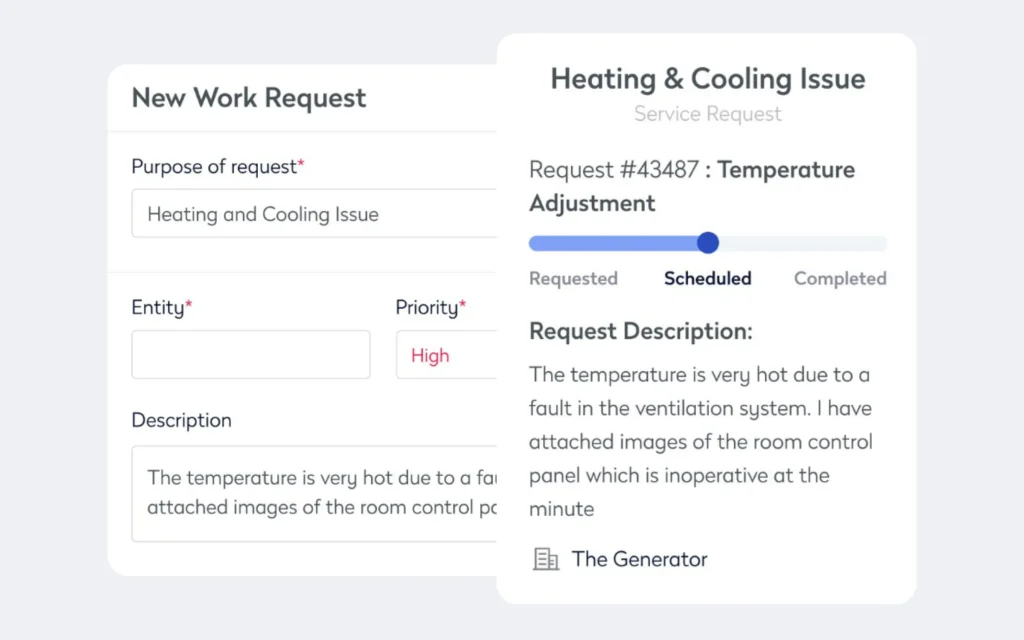
One of the biggest advantages is how having the requests already inside the system makes it easier to see all your open and scheduled work orders, giving you the big picture so you can best match your team to your tasks.
Generate
Once the requests are in and you know the order you’re going to do them, it’s time to start building the work orders. Instead of forcing you to write everything out longhand or type it into a spreadsheet, maintenance management software lets you generate data-packed work orders with just a few clicks.
Work orders include:
- Customizable checklists
- Step-by-step instructions
- Associated parts and materials
- Digital copies of schematics and OEM manuals
Because it’s so easy to include information, techs get work orders with everything they need to come prepared, follow all best practices, and close out early.
And with site maps and interactive floorplans, techs know exactly where to go and how to get there.
Assign and track
Modern maintenance management software is backed by cloud computing, so all the data lives inside a database everyone in the maintenance department can access from anywhere, at any time. When you assign a work order, techs can use any mobile device to access it. No more running back to the office to pick up paperwork. And no more emailing spreadsheet files back and forth every time there’s a change. Because it’s all kept in one spot, everyone is working from the same up-to-date data. When you assign a work order, the tech knows right away, and when they close it out, you know right away.
Importance of modern maintenance workflows for facility managers
With a modern platform, you can instantly share data across the team. But you can use all that captured data for more than immediate needs, including implementing maintenance strategies and finding efficiencies.
With older maintenance management systems, both paper- and spreadsheet-based ones, you’re spending a lot of time and effort guessing on preventive maintenance inspections and tasks, their frequencies, and then likely missing them anyway.
Because you don’t have easy access to an asset’s maintenance and repairs histories, it’s hard to know what preventive maintenance tasks to set up and how often to schedule them. You can always go by the manufacturers’ recommendations, but those are generally only good when the asset is relatively new. Over time, every asset develops a unique history, so you need a tailored PM plan.
And with older manual-entry systems, PMs easily fall through the cracks. It’s not hard to remember to change a flat tire. You can’t drive the car until you do. But what about rotating them? That’s a lot easier to forget because there are no short-term negative consequences. Without a solid reminder, it’s not going to get done.
What’s the impact of missed PMs? When your PM program is off, costs rise. When you under maintain assets, they’re more prone to failure, there’s more unplanned downtime, and productivity falls, cutting into your budget. On the opposite end, when you over maintain assets, you’re wasting money on labor, parts, and materials.
Set up and schedule
A good software solution does more than collect data; it makes it searchable and “crunchable.” Need to know the last time an asset was worked on? You can find that information easily. Need to know which asset cost you the most in labor and parts over the last six months? Or how often an asset has failed over the last year? The software can crunch the numbers for you and get you those answers easily.
Once you’re able to work with an asset’s maintenance history, you can set up and pick the right preventive maintenance tasks and set the right frequencies. The next step is to schedule them in the software so you can easily see them approaching on your calendar. Preset reminders also help ensure PMs don’t slip through the cracks.
Fine-tune
Even the best preventive maintenance program needs to change over time. As assets age, their maintenance needs change. You might have only needed to change the oil so often on that 1990 F150 back when it was brand new, but two decades and four owners later, it might be drinking oil frequently. There’s no question that you need to make periodic changes to your PM program. But how do you know which changes to make?
Just like when you were setting up PMs, the process of fine-tuning a preventive maintenance program ranges from grueling to impossible when using old-fashioned paper- and spreadsheet-based systems. But with modern platforms, the software does all the heavy lifting for you. It collects the data, keeps it safe and up to date, and then crunches it for you. It’s not mind-numbing rows of endless, disconnected numbers. Instead, it’s insight-packed reports with easy-to-read charts, metrics, and key performance indicators (KPIs).
Modern maintenance workflows help you increase effectiveness and efficiency. Instead of wasting time, energy, and resources, you know what you need to fix and in what order. Technicians arrive onsite with the parts and materials, checklists, and instructions they need to close out quickly. Later, you can leverage your workorder data to improve everything from inventory management to resource allocation.

By Jonathan Davis
As a content creator at Eptura, Jonathan Davis covers asset management, maintenance software, and SaaS solutions, delivering thought leadership with actionable insights across industries such as fleet, manufacturing, healthcare, and hospitality. Jonathan’s writing focuses on topics to help enterprises optimize their operations, including building lifecycle management, digital twins, BIM for facility management, and preventive and predictive maintenance strategies. With a master's degree in journalism and a diverse background that includes writing textbooks, editing video game dialogue, and teaching English as a foreign language, Jonathan brings a versatile perspective to his content creation.