



Field technicians are already working in challenging conditions, from deep inside manufacturing facilities stretched across multi-site portfolios to traveling between wind turbines separated by miles of rural terrain. They navigate basement mechanical rooms with no cell signal, perform maintenance on electrical infrastructure spanning hundreds of miles, and troubleshoot critical equipment inside oil and gas structures where space is tight and stakes are high.
Managing operations across these distributed, often isolated work environments requires more than just talented technicians, though. You need technology built for the realities of the field.
Key takeaways
- First-time fix rate is your most actionable metric: The gap between average and best-in-class performance translates directly to operational costs through repeated truck rolls, wasted labor, and customer dissatisfaction across your portfolio
- Offline functionality isn’t optional for field work: Your technicians work in environments where connectivity fails regularly. True mobile platforms must capture data, sync automatically, and resolve conflicts without requiring constant signal
- Mobile tools unify fragmented operations: When work orders, asset intelligence, safety compliance, and inspection data live in one platform, your field teams gain the context they need to complete jobs on the first visit
Leading organizations are investing in platforms that enable distributed workforces to operate efficiently across complex, geographically dispersed asset portfolios, even when connectivity is unreliable, and work conditions are far from ideal. In fact, the field service management (FSM) market is expected to grow from roughly $5.1 billion in 2025 to $9.17 billion by 2030, according to MarketsandMarkets.
Despite this move in the market, many organizations still operate with fragmented systems. One app handles work orders. Clipboards track safety procedures. Excel manages parts inventory. Technicians toggle between tools, managers lack real-time visibility across sites, and compliance officers spend audit season tracking paper trails from multiple locations.
How to improve first-time fix rate in field service
First-time fix rate (FTFR) measures the percentage of service calls resolved on the first visit, without requiring a callback or additional trip. Industry average FTFR hovers around 80%, while best-in-class organizations achieve 88% or higher, according to research from PTC and Aberdeen Group.
That 8-point gap between average and excellent translates directly to operational costs and customer satisfaction.
Every missed first visit typically requires 1.6 additional dispatches at $200–$300 per truck roll, according to Field Service News industry benchmarking. For a team handling 1,000 service calls monthly with an 80% FTFR, you’re sending technicians back out 200 times unnecessarily. That’s roughly 320 extra truck rolls per month, costing between $64,000 and $96,000 in wasted labor and travel every month.
The problem compounds when you’re managing multiple sites across an enterprise portfolio. A failed first visit at your Chicago facility doesn’t just cost one truck roll—it means coordinating schedules across time zones, potentially pulling a specialist from another region, and explaining delays to building occupants who expected the issue resolved yesterday.
Best offline mobile apps for field technicians
You send a technician 90 miles out to service wind turbines on a remote wind farm. No cell signal. Or they descend into a basement utility tunnel beneath your campus to inspect mechanical systems. Connection drops. In both scenarios, if your mobile app requires constant connectivity, work stops, or you’re gambling on memory and paper notes.
This isn’t a minor inconvenience when you’re managing assets across multiple sites or remote locations. A technician working through offshore oil platforms, utility substations in rural areas, or dense manufacturing facilities with RF interference can’t afford to lose access to work orders, asset histories, or safety procedures.
True offline functionality must include:
- Full data capture without connectivity: Signatures, photos, time logs, equipment readings, and notes all save locally without any signal
- Automatic synchronization: Everything syncs when connection returns, without manual re-entry or data loss
- Conflict resolution controls: Define how the system handles edits when two technicians modify the same work order offline
Together, these capabilities ensure technicians maintain full productivity regardless of connectivity, eliminating the costly delays and data recreation that plague traditional mobile apps.
Mobile asset management systems for field service
Traditional workflows send your technicians to sites, whether that’s building 47 of your corporate portfolio or a remote pump station, with a work order number and minimal context.
They arrive, assess the situation, and discover they need a part that’s back at your central warehouse. Or they lack the technical documentation to troubleshoot a complex system. Now you’re scheduling callbacks, wasting drive time, which matters more when sites are many miles apart, and explaining delays to frustrated stakeholders.
Asset intelligence platforms should deliver instant access to:
- Complete asset history: Past work orders, recurring failures, last preventive maintenance date, and compliance inspection records
- Manufacturer documentation: Operating manuals, wiring diagrams, and technical specifications
- Real-time parts inventory: On-hand quantities at your nearest warehouse or service vehicle
- Safety documentation: Data sheets and safety procedures accessible offline
So, your technician is servicing elevators across a university campus with 30 buildings. They scan an elevator’s QR code and immediately see that its last preventive maintenance was eight months ago, two months overdue. The system then serves up your standard PM checklist and confirms the needed parts are in their truck.
They complete service in one visit instead of making two trips across campus or, worse, returning from your main facility across town.
Digital safety checklists for field technicians
Paper-based safety procedures create gaps in your operations, particularly when you’re managing work across multiple sites or in high-risk environments like confined spaces within industrial facilities.
Illegible handwriting on permit-to-work forms. Missing signatures on lockout/tagout (LOTO) checklists. Documents lost in transit between your Denver facility and your Austin office. Forms sitting in trucks while you have no visibility into what’s actually happening in the field.
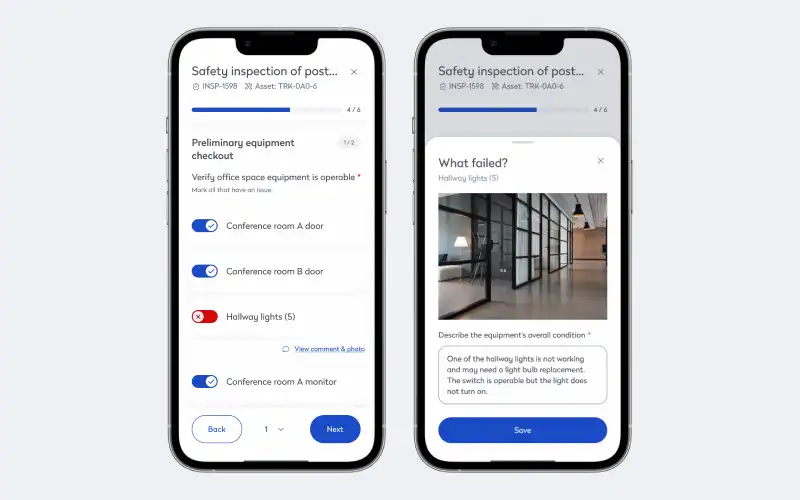
When safety documentation lives separate from your core work management system, your technicians working alone at remote sites or deep inside complex structures face an impossible choice: skip steps to save time or do double data entry that nobody values.
LOTO standards require documented energy control procedures with verified isolation and authorized signatures, according to OSHA regulations. For organizations operating across multiple sites, this means maintaining consistent safety standards whether your technician is working in your flagship building or at a remote location three states away.
Imagine your technician is performing electrical maintenance on energized equipment at a remote facility requiring a three-step LOTO sequence.
First, their supervisor reviews the work plan remotely and grants permission electronically. Second, your technician photographs the installed locks to verify proper isolation. Third, the system logs completion with timestamps and all required signatures. You can see compliance status in real-time across all sites. You now have a complete, centralized compliance trail without slowing down field work.
Mobile inspection software for preventive maintenance
Mobile inspection tools let your technicians capture real equipment conditions across all sites, including pressure readings, temperature measurements, vibration levels, visual observations. When readings fall outside acceptable thresholds at any location, the system automatically generates follow-up work orders with appropriate priority and skill requirements.
It’s an approach that helps you leverage the P-F curve, giving you visibility into the interval between when equipment begins deteriorating and when it fails. By catching issues in that window, you can schedule repairs strategically rather than responding to emergency breakdowns.
Picture monthly fire suppression system inspections across a 45-building healthcare campus. Any “low pressure” readings at any location automatically generate recharge work orders assigned to certified technicians in that region.
Building mobile-first operations that work everywhere
Mobile field service capabilities have evolved from competitive edge to operational necessity. Whether you’re managing corporate real estate across 20 cities, maintaining utility infrastructure across rural territories, or keeping industrial facilities running across multiple continents, your teams need tools that work in basements, on rooftops, at remote sites, and everywhere in between.
Connect with our field services experts to see how Eptura handles offline work, asset intelligence, and safety compliance in a live demo.
Frequently asked questions

By Jonathan Davis
As a content creator at Eptura, Jonathan Davis covers asset management, maintenance software, and SaaS solutions, delivering thought leadership with actionable insights across industries such as fleet, manufacturing, healthcare, and hospitality. Jonathan’s writing focuses on topics to help enterprises optimize their operations, including building lifecycle management, digital twins, BIM for facility management, and preventive and predictive maintenance strategies. With a master's degree in journalism and a diverse background that includes writing textbooks, editing video game dialogue, and teaching English as a foreign language, Jonathan brings a versatile perspective to his content creation.